From Hack a Day: http://hackaday.com/2012/06/29/self-balancer-does-it-differently-than-were-used-to-seeing/
and http://hackaday.com/2012/03/25/self-stabilizing-autonomous-bicycle/
These mechanisms use a "reaction wheel" that moves the object against any tipping action by rotating in the opposite direction. This is using the concept of conservation of angular momentum: wheel spins one way, object spins the other way to conserve angular momentum. So, the whole system moves against any tipping caused by external forces or inefficiencies.
The bikes have a reaction wheel mounted perpendicular to the main bike wheels. This first bike is from an Asian Youtube user and is a miniature bike. He also has a unicycle that moves forwards and backwards to stabilize in that direction, whereas a perpendicular reaction wheel stabilizes side to side motion.
The second video shows a full size bike and an inverted pendulum using this concept. (For a student's diploma thesis.)
Showing posts with label inspiration. Show all posts
Showing posts with label inspiration. Show all posts
Wednesday, August 15, 2012

Cheap flex sensors with electrostatic bags and masking tape
From Hack a Day: http://hackaday.com/2012/06/04/making-flex-sensors-on-the-cheap/
Instructable: http://www.instructables.com/id/DIY-Bend-Sensor-Using-only-Velostat-and-Masking-T/
Flex sensors change their resistivitiy when bent. These are DIY flex sensors made with electrostatic bags (Velostat) and masking tape. A zip tie is used for reinforcement. Two wires are attached to strips of the electrostatic material, with two more layers loosely sandwiched between these. This is taped together with a zip tie added.


Instructable: http://www.instructables.com/id/DIY-Bend-Sensor-Using-only-Velostat-and-Masking-T/
Flex sensors change their resistivitiy when bent. These are DIY flex sensors made with electrostatic bags (Velostat) and masking tape. A zip tie is used for reinforcement. Two wires are attached to strips of the electrostatic material, with two more layers loosely sandwiched between these. This is taped together with a zip tie added.


Thursday, May 17, 2012
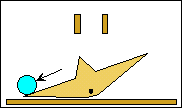
Curved flexible sheet creating a flip flop, valve, or flap
I saw a classmate recognize this in class once and he was showing it to our Physics teacher. Hold a piece of paper in your hand on the side like you're grabbing a plate or the side of a tray and curve it using your fingers and thumb on either side of the paper. Then drop something on the other end of the paper. If you orient the paper concave up, the object will be caught inside the scoop shape. If you orient the paper concave down, the object will collapse the arch shape and drop past the paper onto the table.
Concave up....
 ...catches the object.
 Concave down...
 ...lets the object fall past as the paper bends. Usually the object slides down one of the sides of the arch too, so you'd have to account for that in a practical application.

This reminds me of a flip-flop, valve, or flap, such as the ones seen in sorting machines or marble machines.
You could make this with a material that is a little more stiff and predictable, like rubber or a flexible plastic. The flap could be rotated with a motor or a rotating pneumatic actuator. It could be angled so that when an object gets caught on the concave up side it slides down and away like in a channel.
However, the same actuator that rotates the flap can be used to direct objects much more simply. The two-way action could be done with a stiff, spring loaded flap that is kept from moving one way with a stopper or ledge, like a door jam, and able to freely open in the other direction. So this flap design must be uniquely beneficial for the resources of an actuator to be used up in this way.
One beneficial example I've thought of (which doesn't even require an actuator) is a door into a container that keeps objects from getting out (concave up side faces inside container), but lets objects in (concave down side faces out). This container could be vibrating or tumbling the objects inside, so a one-way opening is needed. The container might be naturally round, like a tire, so this concave flap could be built into its geometry, instead of being an abnormality like a square or circular door.
Search sorting machine on Youtube, or Lego sorting machine.
Related marble machine flip flop:
http://www.sentex.net/~mwandel/marbles/flipflop.html


Concave up....


This reminds me of a flip-flop, valve, or flap, such as the ones seen in sorting machines or marble machines.
You could make this with a material that is a little more stiff and predictable, like rubber or a flexible plastic. The flap could be rotated with a motor or a rotating pneumatic actuator. It could be angled so that when an object gets caught on the concave up side it slides down and away like in a channel.
However, the same actuator that rotates the flap can be used to direct objects much more simply. The two-way action could be done with a stiff, spring loaded flap that is kept from moving one way with a stopper or ledge, like a door jam, and able to freely open in the other direction. So this flap design must be uniquely beneficial for the resources of an actuator to be used up in this way.
One beneficial example I've thought of (which doesn't even require an actuator) is a door into a container that keeps objects from getting out (concave up side faces inside container), but lets objects in (concave down side faces out). This container could be vibrating or tumbling the objects inside, so a one-way opening is needed. The container might be naturally round, like a tire, so this concave flap could be built into its geometry, instead of being an abnormality like a square or circular door.
Search sorting machine on Youtube, or Lego sorting machine.
Related marble machine flip flop:
http://www.sentex.net/~mwandel/marbles/flipflop.html

Metals that can be molded like plastics
From Makezine.com: http://blog.makezine.com/2012/01/13/metals-that-can-be-molded-like-plastics/

The original article is very good at describing the situation and solution to making metals that are less like hard, orderly crystals and more like grainy, moldable, "amorphous" materials like glass and plastic. The method involves cooling the metal quickly enough so that its molecules don't have enough time to settle down in an orderly configuration and must "freeze" where they are. However, this is practically impossible with pure metals since they have all the same atoms and are extremely orderly to begin with. You can't remove heat fast enough. So alloys are made where the mixture of atoms has a distribution of sizes that do not settle easily.
The first alloy was created in the lab in 1960, from three atoms of silver for each atom of silicon. However, "elaborate means were required to cool the samples fast enough, and they had to be small and thin—wires, ribbons, or foils less than 100 micrometers thick."
In the 1990s, researchers at CalTech made a better alloy with a lower "critical cooling rate."


The original article is very good at describing the situation and solution to making metals that are less like hard, orderly crystals and more like grainy, moldable, "amorphous" materials like glass and plastic. The method involves cooling the metal quickly enough so that its molecules don't have enough time to settle down in an orderly configuration and must "freeze" where they are. However, this is practically impossible with pure metals since they have all the same atoms and are extremely orderly to begin with. You can't remove heat fast enough. So alloys are made where the mixture of atoms has a distribution of sizes that do not settle easily.
The first alloy was created in the lab in 1960, from three atoms of silver for each atom of silicon. However, "elaborate means were required to cool the samples fast enough, and they had to be small and thin—wires, ribbons, or foils less than 100 micrometers thick."
In the 1990s, researchers at CalTech made a better alloy with a lower "critical cooling rate."
The first commercial amorphous metal alloy was brought to market in 2003 by CalTech spin-off Liquidmetal Technologies. Called Vitreloy 1, it’s about 40% zirconium, 20% berylium, and 10% each of titanium, copper, and nickel.Again, read the original article, it has the best information there.
Vitreloy 1 and its successors have a number of exceptional properties. They are strong, hard, and (unlike crystalline metals) they do not shrink appreciably on freezing, and thus can be injection-molded, blow-molded, and otherwise formed using the same economical processes as plastics. Designing tooling for amorphous metals requires paying attention to the critical cooling rate of the material; if some volume of the part cools too slowly, the alloy there will crystallize, shrink, and spoil it.

Ranque-Hilsch vortex tube
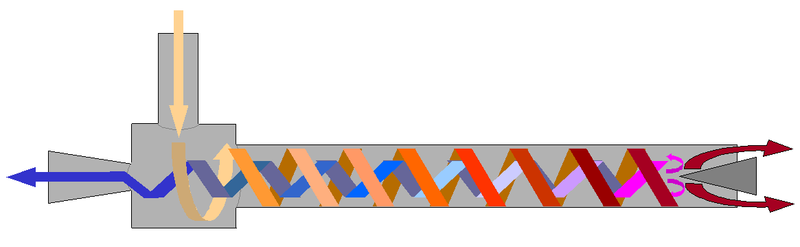
A tube that separates a neutral temperature stream of compressed air into hot and cold streams, with no moving parts. There are multiple explanations for how it works. Air is fed into the main tube by small tangential inlets, so the gas swirls. After that there are separating-effects at the ends, which have uniquely shaped openings.
This Hack-a-day post shows how to make one, by Otto Belden. Note the efficiency!
"His latest version, which you can see in the video below, takes compressed air at about 78degrees and spits out about 112degrees on the hot side and 8degrees on the cold side."

From Wikipedia:
-----------
The vortex tube, also known as the Ranque-Hilsch vortex tube, is a mechanical device that separates a compressed gasinto hot and cold streams. It has no moving parts.Pressurized gas is injected tangentially into a swirl chamber and accelerated to a high rate of rotation. Due to the conical nozzleat the end of the tube, only the outer shell of the compressed gas is allowed to escape at that end. The remainder of the gas is forced to return in an inner vortex of reduced diameter within the outer vortex.
There are different explanations for the effect and there is debate on which explanation is best or correct.
What is usually agreed upon is that the air in the tube experiences mostly "solid body rotation", which simply means the rotation rate (angular velocity) of the inner gas is the same as that of the outer gas. This is different from what most consider standardvortex behavior — where inner fluid spins at a higher rate than outer fluid. The (mostly) solid body rotation is probably due to the long time which each parcel of air remains in the vortex — allowing friction between the inner parcels and outer parcels to have a notable effect.
It is also usually agreed upon that there is a slight effect of hot air tending to "rise" toward the center, but this effect is negligible — especially if turbulence is kept to a minimum.
One simple explanation is that the outer air is under higher pressure than the inner air (because of centrifugal force). Therefore the temperature of the outer air is higher than that of the inner air.
Another explanation is that as both vortices rotate at the same angular velocity and direction, the inner vortex has lost angular momentum. The decrease of angular momentum is transferred as kinetic energy to the outer vortex, resulting in separated flows of hot and cold gas.[1]
This is somewhat analogous to a Peltier effect device, which uses electrical pressure (voltage) to move heat to one side of a dissimilar metal junction, causing the other side to grow cold.
When used to refrigerate, heat-sinking the whole vortex tube is helpful.
-----------
Robot climbs cloth by rolling along a wringle
From IEEE Automation: http://spectrum.ieee.org/automaton/robotics/home-robots/clothbot-has-no-trouble-navigating-your-pants
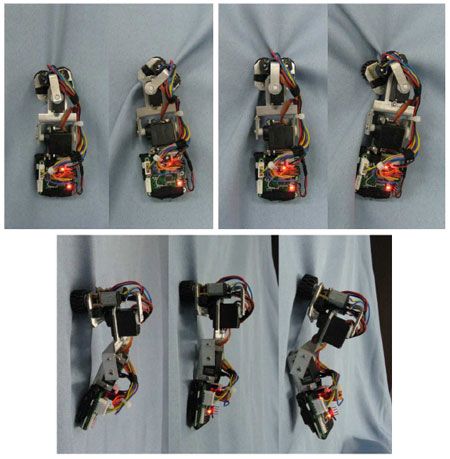
From the Chinese Academy of Science, called Clothbot. It has two rollers/wheels that pinch the material into a wrinkle, then roll up (or down) this winkle like on a rail. Motors twist the tail/body and the wheels to change direction.

From the Chinese Academy of Science, called Clothbot. It has two rollers/wheels that pinch the material into a wrinkle, then roll up (or down) this winkle like on a rail. Motors twist the tail/body and the wheels to change direction.
Thursday, January 5, 2012
The Tesla Valve
From Makezine.com: http://blog.makezine.com/archive/2012/01/the-tesla-valve-one-way-flow-with-no-moving-parts.html
The Tesla Valve is a one-way valve with no moving parts. Its geometry resists the flow of a fluid in one direction by redirecting some of it back at itself. I don't think it perfectly stops the fluid but it greatly resists it.

Shapeways user imperator made a printable version (with an unpictured cover) which he demonstrates in the video by blowing through it.

The Tesla Valve is a one-way valve with no moving parts. Its geometry resists the flow of a fluid in one direction by redirecting some of it back at itself. I don't think it perfectly stops the fluid but it greatly resists it.

Shapeways user imperator made a printable version (with an unpictured cover) which he demonstrates in the video by blowing through it.

Putting tails on terrestrial/driving robots for stabilitation
From IEEE Spectrum: http://spectrum.ieee.org/automaton/robotics/diy/dinosaurlike-tails-make-terrestrial-mobile-robots-more-agile
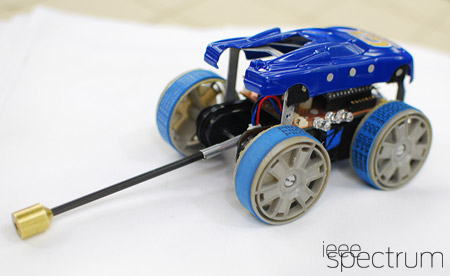
This is a really clever idea that I'm surprised I've never seen before. Researchers from UC Berkeley put a tail on an RC car robot which moves up and down to stabilize it in the air as it goes off jumps and such. The tail simply turns to move the rest of the car body in the desired position as it flies through the air. Based on conservation of angular momentum, if the tail applies a torque within the tail-body system and moves one way, the body must counteract that and move in the other direction. They are using simple but interesting physics to their advantage. This is all based on how lizards and dinosaurs jump with their tails.

The video below is helpful. It shows the car dropped from an initially nose-down position and recovering to be level, as well as going over a steep bump.
This is a really clever idea that I'm surprised I've never seen before. Researchers from UC Berkeley put a tail on an RC car robot which moves up and down to stabilize it in the air as it goes off jumps and such. The tail simply turns to move the rest of the car body in the desired position as it flies through the air. Based on conservation of angular momentum, if the tail applies a torque within the tail-body system and moves one way, the body must counteract that and move in the other direction. They are using simple but interesting physics to their advantage. This is all based on how lizards and dinosaurs jump with their tails.
The video below is helpful. It shows the car dropped from an initially nose-down position and recovering to be level, as well as going over a steep bump.
Wednesday, November 30, 2011
Alarm clock project 1: initial opening and beginning research
This is the first post.
Second post: cutting
Third post: installing buttons and final look
My one complaint with my alarm clock is that the off button is very small. This is the button that turns the alarm off in the morning after it has gone to snooze a couple of times. So naturally you would want it to be big and accessible like the snooze button. But it's not. I thought it would be cool to modify the clock and add a big ol' mash-and-be-done button in its place and just solder the electrical connections to where the original button was. (Later I decided to throw on a bigger button for snooze while I'm at it).

And here's the rest of it! I still need the alarm clock, so I'm using the main circuit board while I'm working on this project. I have to use headphones and the clock's headphone jack since there's no speaker attached anymore. With the volume turned up they are loud enough to wake me up. The clock runs fine without the CD player attached. There's a transformer that takes the house current down to something reasonable, but it's still unnerving to handle a big messy open circuit that's plugged into the wall outlet...

Some inspirational parts:
On the CD player this gear is mounted by this unique piece of plastic (the curvy piece with three parts/arms). It's thin and designed to be flexible so that if the CD read head is driven too far and jams, this part shifts and flexes instead of breaking the gear.

This is how the radio tuner works. It shows which station you're on by this white, plastic-rubber piece. It curls up around the tuning wheel, to which it is attached. It curls and uncurls as you turn the wheel, moving right and left.

Here's a limit switch that has two flat, bendable contacts that are pressed together by a lever when the CD cover closes.
This is the opened position.

Closed position.

A similar switch on the CD player assembly. It's the black and clear plastic extending down from the circuit board in between the two motors. The two metal contacts are visible.
Open position.

Closed position.


Here is the power button area. I've drawn reference marks on scotch tape stuck on the clock. The paper is a stencil of the circuit board that goes underneath.
The shaded area with the X is the only area I can cut and put a button into. There is only a quarter of an inch of depth underneath that (the same size as the grid on the paper). This is not very big compared to what I had in mind, which was to cut away nearly all the available material underneath the power button and put a big ol' button there. Because of structural components that can't be cut away and the button circuit board's ribbon cable, that shaded part is all I have to work with.

I decided that's not enough and I'd have to find a different solution. There weren't any good buttons available that would be as big as that space but not very deep. I also didn't want an unsightly skinny or tall button. I began to think of other places were I could put a button and rout wires to it.
I realized that I could put a button right into the middle of the CD cover. I could leave out the CD player assembly and have lots of space to work with. I never listen to CDs on this clock anyway. Now that there's tons of room, I'm going to put another button for snooze.
I picked Adafruit's new arcade style buttons because they're cheap and look great. They're translucent and have room for an LED, so I might fit one inside and wire it to the button leads so that it lights up when pressed. Hopefully there will be the right kind of current to run the LED.
My other button option was this more boring one from Digi-key.


The total depth that extends down from underneath the button lip is 31.7 mm (from the details tab on the product page). It does not extend far enough to reach where the main circuit board is mounted. I've checked with the circuit board in place and there's tons of room for the button and routing the wire.


Second post: cutting
Third post: installing buttons and final look
My one complaint with my alarm clock is that the off button is very small. This is the button that turns the alarm off in the morning after it has gone to snooze a couple of times. So naturally you would want it to be big and accessible like the snooze button. But it's not. I thought it would be cool to modify the clock and add a big ol' mash-and-be-done button in its place and just solder the electrical connections to where the original button was. (Later I decided to throw on a bigger button for snooze while I'm at it).
Here's a bunch of the parts after it has been taken apart. The circuit board for the buttons was on the top, but you had to get to it from the bottom, so out comes everything in the way. Namely, the main "motherboard" and the CD player components.

And here's the rest of it! I still need the alarm clock, so I'm using the main circuit board while I'm working on this project. I have to use headphones and the clock's headphone jack since there's no speaker attached anymore. With the volume turned up they are loud enough to wake me up. The clock runs fine without the CD player attached. There's a transformer that takes the house current down to something reasonable, but it's still unnerving to handle a big messy open circuit that's plugged into the wall outlet...

Some inspirational parts:
On the CD player this gear is mounted by this unique piece of plastic (the curvy piece with three parts/arms). It's thin and designed to be flexible so that if the CD read head is driven too far and jams, this part shifts and flexes instead of breaking the gear.

This is how the radio tuner works. It shows which station you're on by this white, plastic-rubber piece. It curls up around the tuning wheel, to which it is attached. It curls and uncurls as you turn the wheel, moving right and left.

Here's a limit switch that has two flat, bendable contacts that are pressed together by a lever when the CD cover closes.
This is the opened position.

Closed position.

A similar switch on the CD player assembly. It's the black and clear plastic extending down from the circuit board in between the two motors. The two metal contacts are visible.
Open position.

Closed position.

Initial Project Pictures
Here is the front of the clock showing the size of the buttons. The button tops are a two plastic molds that press on small tactile switches.

Here is the power button area. I've drawn reference marks on scotch tape stuck on the clock. The paper is a stencil of the circuit board that goes underneath.
The shaded area with the X is the only area I can cut and put a button into. There is only a quarter of an inch of depth underneath that (the same size as the grid on the paper). This is not very big compared to what I had in mind, which was to cut away nearly all the available material underneath the power button and put a big ol' button there. Because of structural components that can't be cut away and the button circuit board's ribbon cable, that shaded part is all I have to work with.

I decided that's not enough and I'd have to find a different solution. There weren't any good buttons available that would be as big as that space but not very deep. I also didn't want an unsightly skinny or tall button. I began to think of other places were I could put a button and rout wires to it.
I realized that I could put a button right into the middle of the CD cover. I could leave out the CD player assembly and have lots of space to work with. I never listen to CDs on this clock anyway. Now that there's tons of room, I'm going to put another button for snooze.
I picked Adafruit's new arcade style buttons because they're cheap and look great. They're translucent and have room for an LED, so I might fit one inside and wire it to the button leads so that it lights up when pressed. Hopefully there will be the right kind of current to run the LED.
My other button option was this more boring one from Digi-key.


The total depth that extends down from underneath the button lip is 31.7 mm (from the details tab on the product page). It does not extend far enough to reach where the main circuit board is mounted. I've checked with the circuit board in place and there's tons of room for the button and routing the wire.

Here's another view. The short post is for mounting the CD player and the tall post is for mounting the main circuit board. The penciled line is the limit.

So now I will plan out the size of the buttons and where I'm going to mount them. Then when they come in I'll inspect them more, cut the holes, mount them, solder them to wires and solder those to the contact points of the original buttons.
Friday, November 25, 2011
Taking apart a CD drive
A computer at home broke its CD drive, so after a new one was bought and installed, I nabbed the old one. I hoped to find interesting things inside and maybe I could use some parts for future projects. I'm researching and thinking about how I might use the moving frames as part of a plotter or something like that. The stepper motor and the moving frame for the CD read/write head could be pretty useful. Here are some pictures and descriptions.
All the main parts laid out, as viewed from the back of the drive (probably should have made them all face the camera :P ). The circuit boards are mounted underneath the cream-colored plastic frame, and the black CD tray slides into tracks on the top of the frame. I've taped the front cover of the drive to the tray for convenience and to keep track of it.

This next picture is the main mechanism for opening the the CD drive and sliding out the tray.
As you might expect, the tray is driven out by a rack and pinion. The driving pinion gear is the large black one in the upper corner. It is driven by a motor that normally pokes up through the curved, U-shaped space visible in the center (this drives the smaller black pulley with a rubber-band like belt).
The white plastic bar is instrumental for multiple things. When it is all the way to the left or right, the tray itself interacts with it and pushes it into the pinion gear, which moves it further. But then it gets moved out of the reach of both the pinion gear and the tray. It sits in one position or another (all the way right or left) until the tray moves the opposite way, interacts with it again, pushes it into the pinion gear, which moves it back the other way. More pictures of this later.
The CD read/write head and spinning motor frame is partially visible here (hereafter called the "rocker frame" for lack of a better name, because of the following description). This actually swings/falls down and away from the tray when it moves out. The front mechanism also involves this motion. When the white plastic bar moves sideways, it moves the rocker frame up and down. There are nubs in the frame that stick into the curved grooves in the white bar. These S-shaped grooves are also partially visible, since the rocker frame is in the down position.
If the CD drive jams, a paperclip can be poked through a hole in the front to open the tray. I've always wondered what it pushes inside. It goes through the square hole on the left and pushes the stubby, left-facing-L-shaped, white piece of plastic, which swings and pushes the white bar to the side by the straight bar it's a part of.
The small green circuit board is for burning LightScribe disks. They have tops that text or images can be burned into, I think with a laser.

A clearer overhead view of the front mechanism.

Here is a picture that includes a bottom view of the CD tray (as if it was flipped up). Here you can see the grooves that interact with the rest of the drive. This picture is annotated below.


A front view of the drive with one of the circuit boards laid into place. The previously mentioned piece of plastic that the paper clip pushes on is close to the hole now.

A view of the front mechanism circuit board. The center black square with the two buttons sticking up is used to see if the tray is fully in or out. See the next picture.


A bottom view of the rocker frame, with the CD read/write head and spinning motor.

The rocker frame attaches to the main frame here with latches holding onto short axles for when it swings away from the CD tray.

The rocker frame taken out. Note the two black nubs mentioned earlier, now facing the bottom right corner of the picture. See the next picture.

Those nubs fit into these S-shaped grooves, also mentioned earlier.

A close up on the motor and screw gear that move the read/write head. I believe this motor is a stepper motor because it needs to be precise and because there are four electrical connections to it.

Here's a view of the read/write head. It's a precisely balanced laser with a lens. Notice the wires and silver metal blocks which appear to be magnets. I believe this is how the lens is precisely positioned.

Another view of the lens.

All the main parts laid out, as viewed from the back of the drive (probably should have made them all face the camera :P ). The circuit boards are mounted underneath the cream-colored plastic frame, and the black CD tray slides into tracks on the top of the frame. I've taped the front cover of the drive to the tray for convenience and to keep track of it.

This next picture is the main mechanism for opening the the CD drive and sliding out the tray.
As you might expect, the tray is driven out by a rack and pinion. The driving pinion gear is the large black one in the upper corner. It is driven by a motor that normally pokes up through the curved, U-shaped space visible in the center (this drives the smaller black pulley with a rubber-band like belt).
The white plastic bar is instrumental for multiple things. When it is all the way to the left or right, the tray itself interacts with it and pushes it into the pinion gear, which moves it further. But then it gets moved out of the reach of both the pinion gear and the tray. It sits in one position or another (all the way right or left) until the tray moves the opposite way, interacts with it again, pushes it into the pinion gear, which moves it back the other way. More pictures of this later.
The CD read/write head and spinning motor frame is partially visible here (hereafter called the "rocker frame" for lack of a better name, because of the following description). This actually swings/falls down and away from the tray when it moves out. The front mechanism also involves this motion. When the white plastic bar moves sideways, it moves the rocker frame up and down. There are nubs in the frame that stick into the curved grooves in the white bar. These S-shaped grooves are also partially visible, since the rocker frame is in the down position.
If the CD drive jams, a paperclip can be poked through a hole in the front to open the tray. I've always wondered what it pushes inside. It goes through the square hole on the left and pushes the stubby, left-facing-L-shaped, white piece of plastic, which swings and pushes the white bar to the side by the straight bar it's a part of.
The small green circuit board is for burning LightScribe disks. They have tops that text or images can be burned into, I think with a laser.

A clearer overhead view of the front mechanism.

Here is a picture that includes a bottom view of the CD tray (as if it was flipped up). Here you can see the grooves that interact with the rest of the drive. This picture is annotated below.

The red parts interact with each other at later times than the blue parts. I'm not exactly sure when or in what way, exactly. But at the ends of the highlighted grooves in the tray there are angled parts that move the nubs on the white bar, so that's the basic idea.

A front view of the drive with one of the circuit boards laid into place. The previously mentioned piece of plastic that the paper clip pushes on is close to the hole now.

A view of the front mechanism circuit board. The center black square with the two buttons sticking up is used to see if the tray is fully in or out. See the next picture.

In the middle you can see those two buttons. They normally poke up farther through the cream-colored plastic frame if the circuit board was attached completely. The rectangular tabs on the white bar slide over the buttons and depress them in certain positions. The upper tab is close to one of these buttons in this picture.

A bottom view of the rocker frame, with the CD read/write head and spinning motor.

The rocker frame attaches to the main frame here with latches holding onto short axles for when it swings away from the CD tray.

The rocker frame taken out. Note the two black nubs mentioned earlier, now facing the bottom right corner of the picture. See the next picture.

Those nubs fit into these S-shaped grooves, also mentioned earlier.

A close up on the motor and screw gear that move the read/write head. I believe this motor is a stepper motor because it needs to be precise and because there are four electrical connections to it.

Here's a view of the read/write head. It's a precisely balanced laser with a lens. Notice the wires and silver metal blocks which appear to be magnets. I believe this is how the lens is precisely positioned.

Another view of the lens.

Monday, September 12, 2011
Tubalcain machine shop Youtube videos
(Many of tubalcain's videos are posted on makezine.com, which is where I initially heard about them)
----------------
Here's a list of all his videos in order, including other series besides Machine Shop Tips!
However, I'm not sure if it's updated with his newest videos. I have looked through this list and now I get updated about new videos after subscribing to his channel on YouTube.
http://neme-s.org/Tubalcain/machine_shop_tips.htm
----------------
http://www.youtube.com/user/mrpete222
Tubalcain is a retired machine shop teacher that has many interesting how-to, tips, and teaching videos on Youtube. They are all excellent and he has many of them. His Machine Shop Tips series is well known.
Samples:
Sine bar (helps with machining angles):
Hole transferring (drilling a hole in an exact, corresponding place):
----------------
Here's a list of all his videos in order, including other series besides Machine Shop Tips!
However, I'm not sure if it's updated with his newest videos. I have looked through this list and now I get updated about new videos after subscribing to his channel on YouTube.
http://neme-s.org/Tubalcain/machine_shop_tips.htm
----------------
http://www.youtube.com/user/mrpete222
Tubalcain is a retired machine shop teacher that has many interesting how-to, tips, and teaching videos on Youtube. They are all excellent and he has many of them. His Machine Shop Tips series is well known.
Samples:
Sine bar (helps with machining angles):
Hole transferring (drilling a hole in an exact, corresponding place):
Dean Williams' mechanical engineering and machining site
(I think I was led to this from a post on makezine.com)
http://www.deansphotographica.com/machining/projects/projects.html
Dean Williams' site has many projects that he has done with his metalworking machines, such as lathes and CNCs. He makes many of his own tools for machining and cutting in unique ways. I wish I new more about the kinds of things he does.
Some samples:
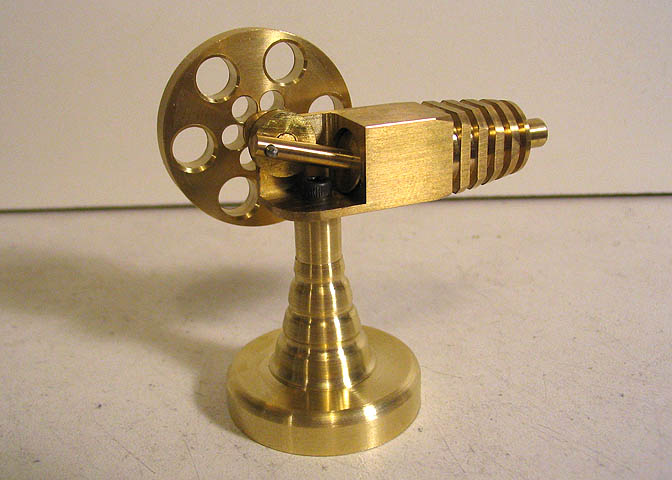
Building a rocker engine (pneumatic engine):
http://www.deansphotographica.com/machining/engines/rocker/rocker.html


http://www.deansphotographica.com/machining/projects/projects.html
Dean Williams' site has many projects that he has done with his metalworking machines, such as lathes and CNCs. He makes many of his own tools for machining and cutting in unique ways. I wish I new more about the kinds of things he does.
Some samples:
Building a rocker engine (pneumatic engine):
http://www.deansphotographica.com/machining/engines/rocker/rocker.html
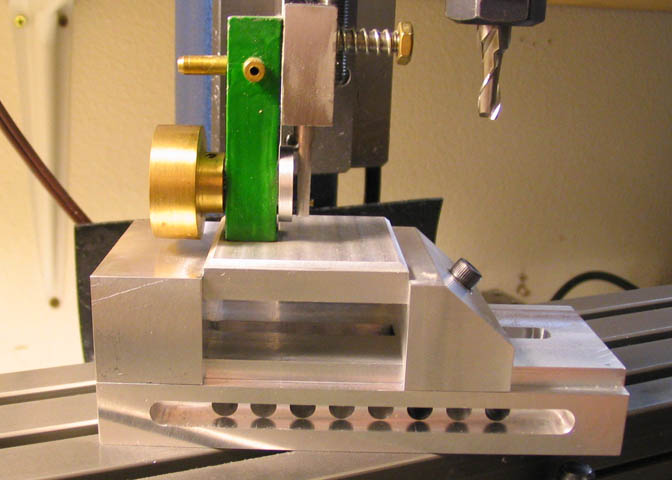
Making a screwless vice (utilizes ball bearings):
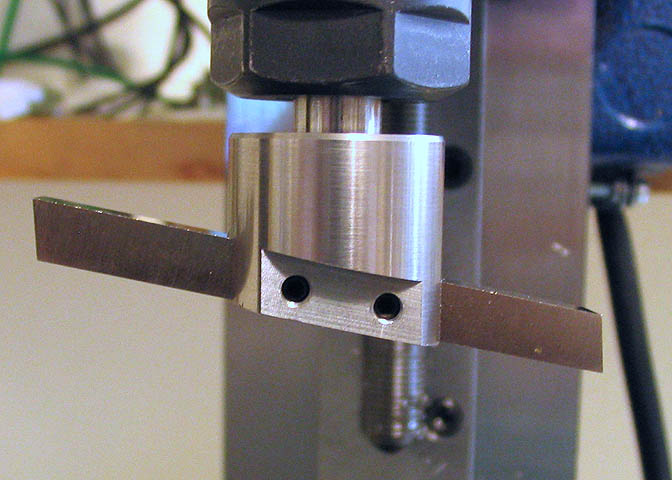
Making a flycutter (a type of bit for accurately machining the inside diameter of a hole??)
Lego and iPod Touch integration
(I'm not sure where I found this, I think from makezine.com)
Some super innovative ideas for integrating a screen (iPod touch) with Lego creations.
First, a cover that has rubber studs on it for attaching Legos to.

This can be used to build the iPod into a creation to use it as a display. But the makers don't just think of it as like a user display or interaction, but also as a sort of object that is part of the creation itself, like an illusion. Here's an example where the screen is the bed of a dump truck. It displays the "material" in the truck, which "dumps out" as the bed is tilted.

Some super innovative ideas for integrating a screen (iPod touch) with Lego creations.
First, a cover that has rubber studs on it for attaching Legos to.
This can be used to build the iPod into a creation to use it as a display. But the makers don't just think of it as like a user display or interaction, but also as a sort of object that is part of the creation itself, like an illusion. Here's an example where the screen is the bed of a dump truck. It displays the "material" in the truck, which "dumps out" as the bed is tilted.
Subscribe to:
Posts (Atom)